
OPTIMIZED AI INFERENCE

Serve

GET CARBONFORGE OPTIMIZED MODELS

Optimized for the open models teams actually run

Your inference workloads are growing 10x a year.
Customer expectations are growing even faster.

CarbonForge keeps you ahead. We optimize the inference models you serve to free up capacity, improve margins, increase AI performance, and improve AI quality for customers.


qwen-black BATCH

Qwen3.6 35B · BF16

−42% $/M tokens

vs stock vLLM · same latency target

GPU 8×A100 Stack vLLM

qwen-black CODING

Qwen3-Coder-Next · BF16

×2.3 tokens/s

vs stock vLLM · at your latency target

GPU 8×A100 Stack vLLM

deepseek-black AGENTS

DeepSeek V4 Flash · FP8

+34% model budget

vs stock vLLM · same spend

GPU 8×H100 Stack vLLM

Same container, same GPUs, same stack. Only the operating point changes.

Optimized to your model, your GPU, your workload

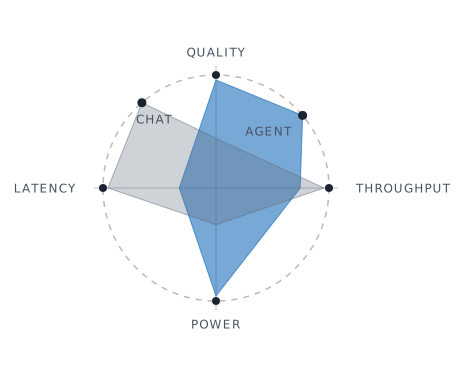
vLLM ships with a default config for every model, but chatbots, agents and batch workloads have different requirements at different times on different GPUs. CarbonForge optimizes for your specific model, workload and GPU — in production, using live telemetry — then locks the result into vLLM and adapts if anything changes.

Chat Agent
carbon-forge-figure-01
Stock vLLM
Manual tuning
CarbonForge
Optimizes for your GPU class
icon-close-2
icon-check
icon-check
Optimizes on top of your fine-tune
icon-close-2
icon-check
icon-check
Optimizes for your workload
icon-close-2
icon-close-2
icon-check
Adapts optimization as traffic shifts
icon-close-2
icon-close-2
icon-check
Never compromises quality for speed
icon-close-2
?
icon-check
Works on a wide range of GPUs
icon-close-2
icon-check
icon-check
Time to deploy
Minutes
Weeks
Minutes
What it costs
Free
Headcount
A share of the savings

Stock vLLM means vLLM with its default settings — the configuration most teams deploy and never revisit.
Every published figure names its GPU, its model, its precision and its vLLM version.


No change to code or infrastructure

CarbonForge optimization ships inside a single container. It runs next to vLLM on your own cloud account and optimizes GPU usage by tuning clock speed, kernel operations, LLM decoding and scheduling. No change to your code or infrastructure. Everything runs in your environment: nothing leaves your account.

Programs and platforms we work with

Subscribe to updates

New optimized containers, benchmark results, and learnings from tuning inference in production. Email about once a month, opt out any time.